Projects are folders
Each team's work is a folder in its own colour. Pin the ones you use to the bar; open one and its board is there.
Κυβερνήτης · the one who steers
Kybernetes OS is an agentic operating system installed on a server or cloud account your company controls. Your people hand it goals. Agents plan the work, carry it out in isolated sandboxes, prove the result and wait for a person wherever money, production or customers are involved.
The film
Where your data goes today, what changes when the agents run inside your perimeter, and who stays in charge.
The console
Kybernetes OS opens as a desktop your people already know how to use. Every project is a folder, the agents at work sit beside them, and every board, task, map and chat opens in its own window. These are real screens from the product, with demo data.

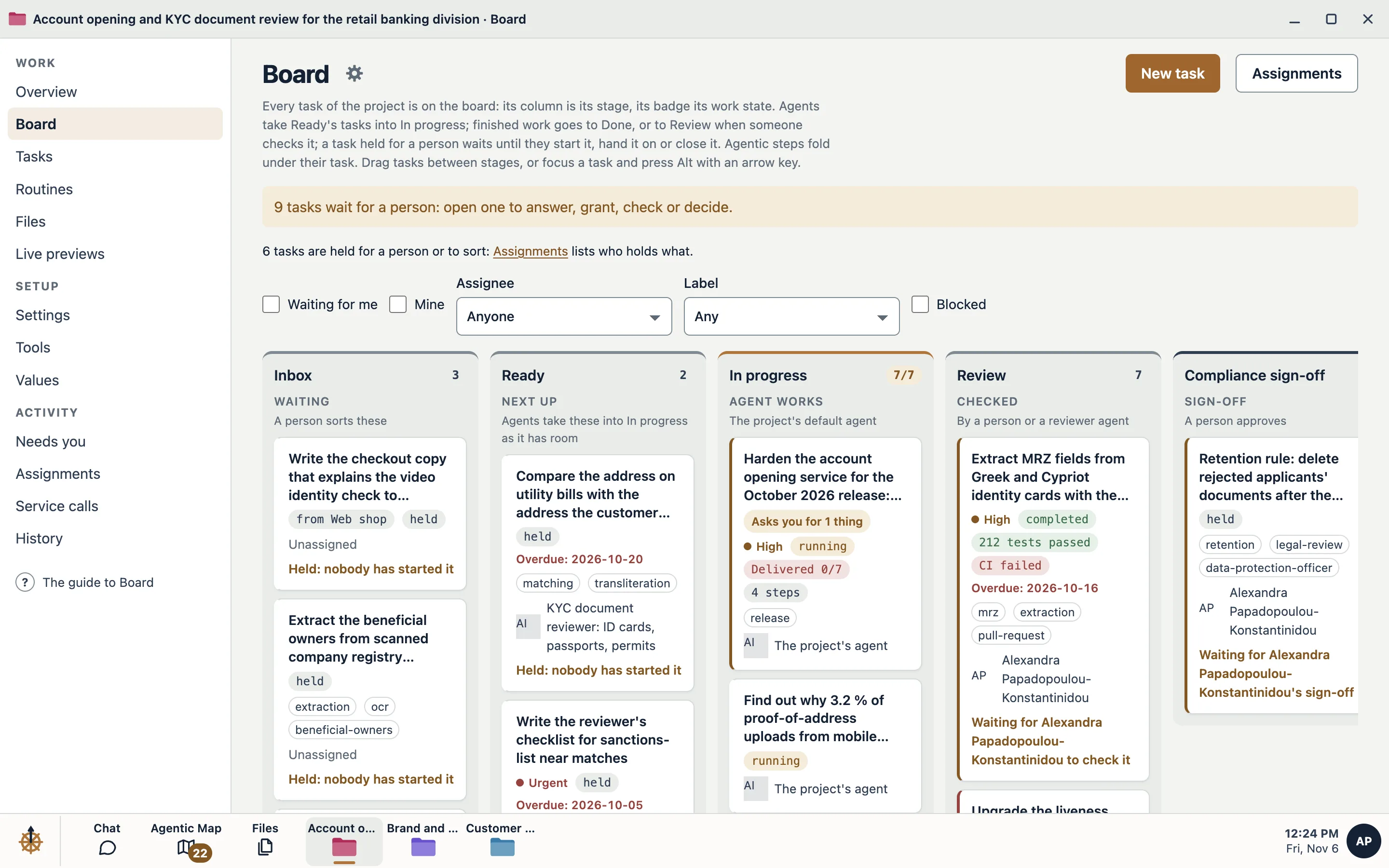
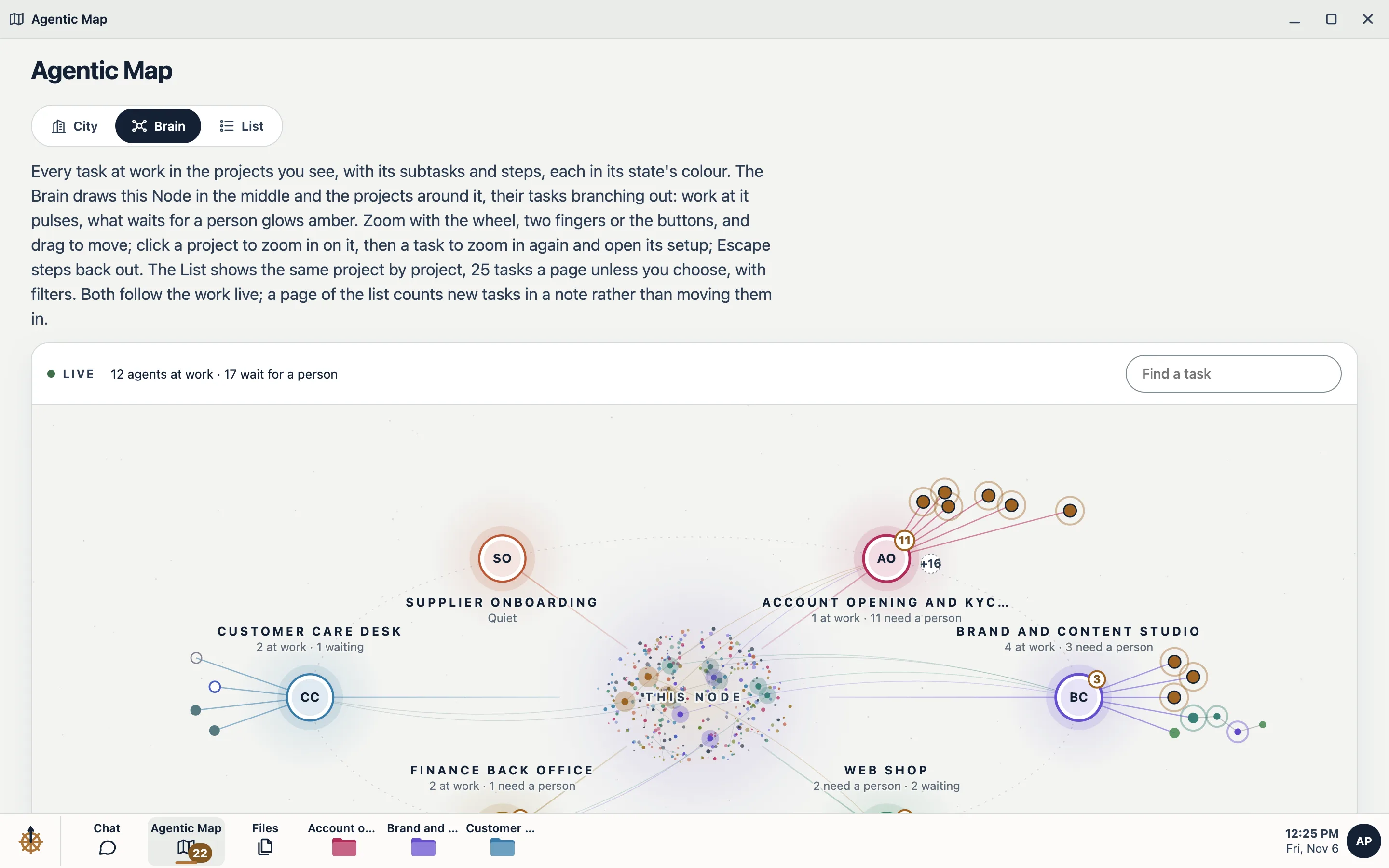
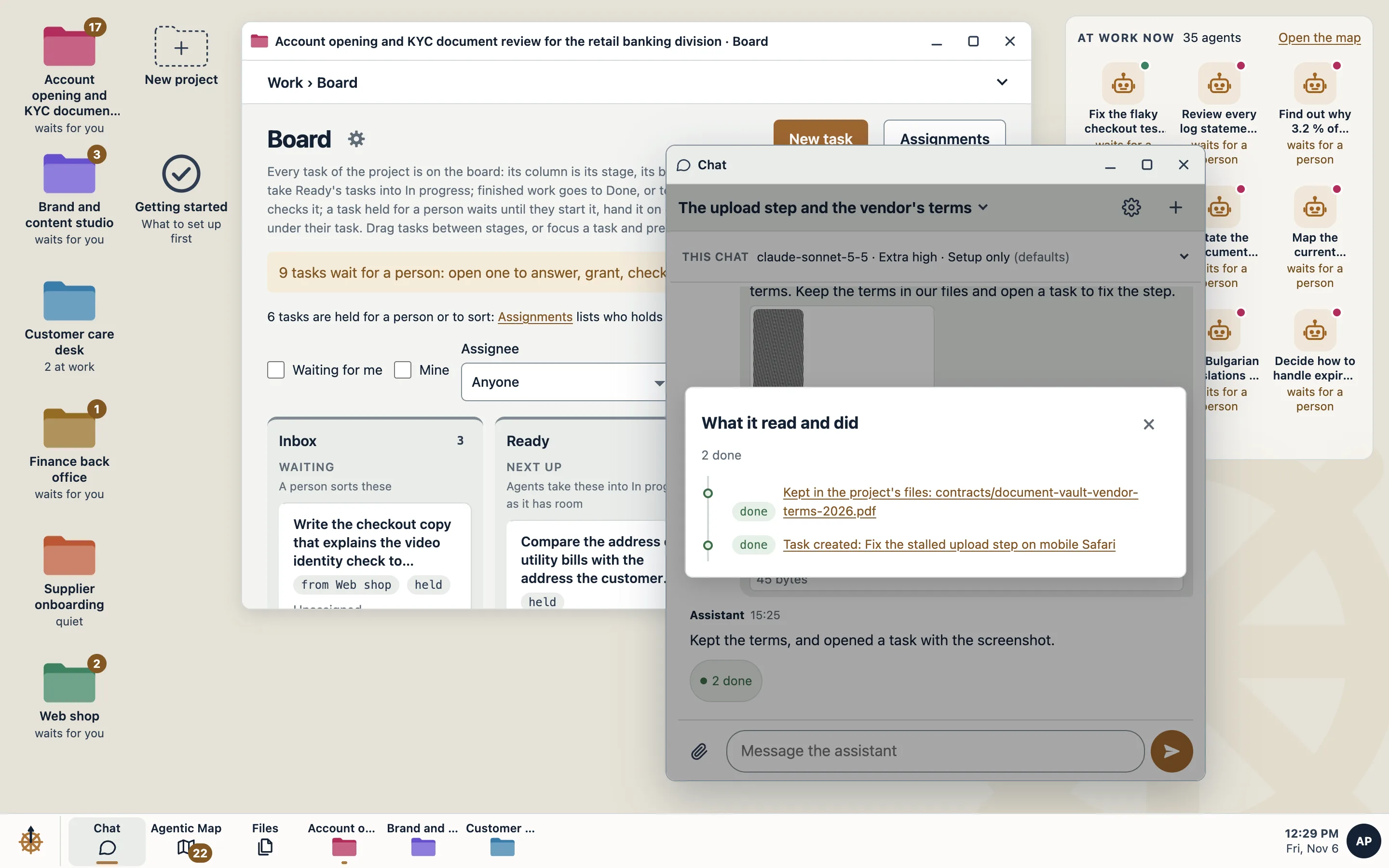
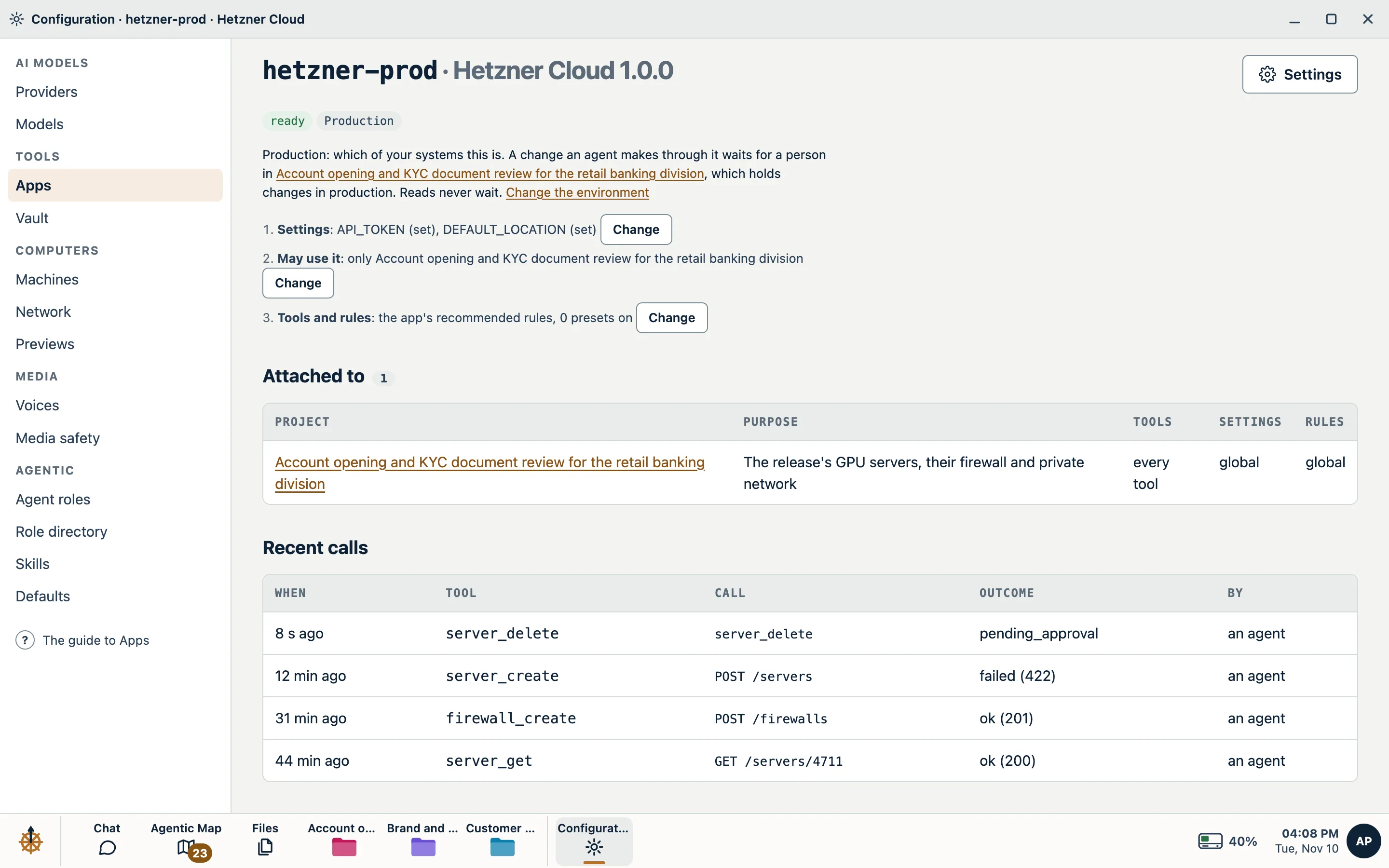
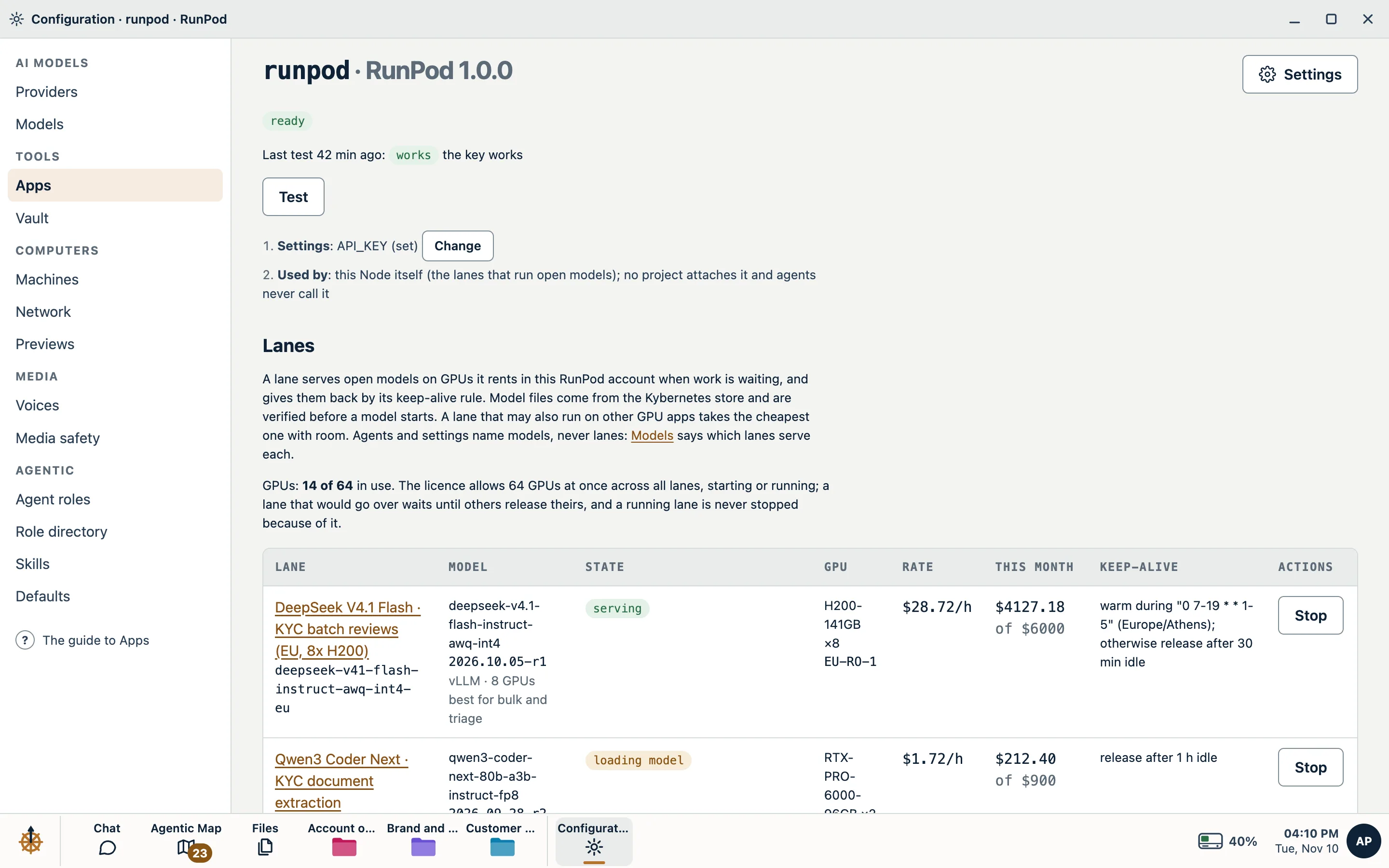
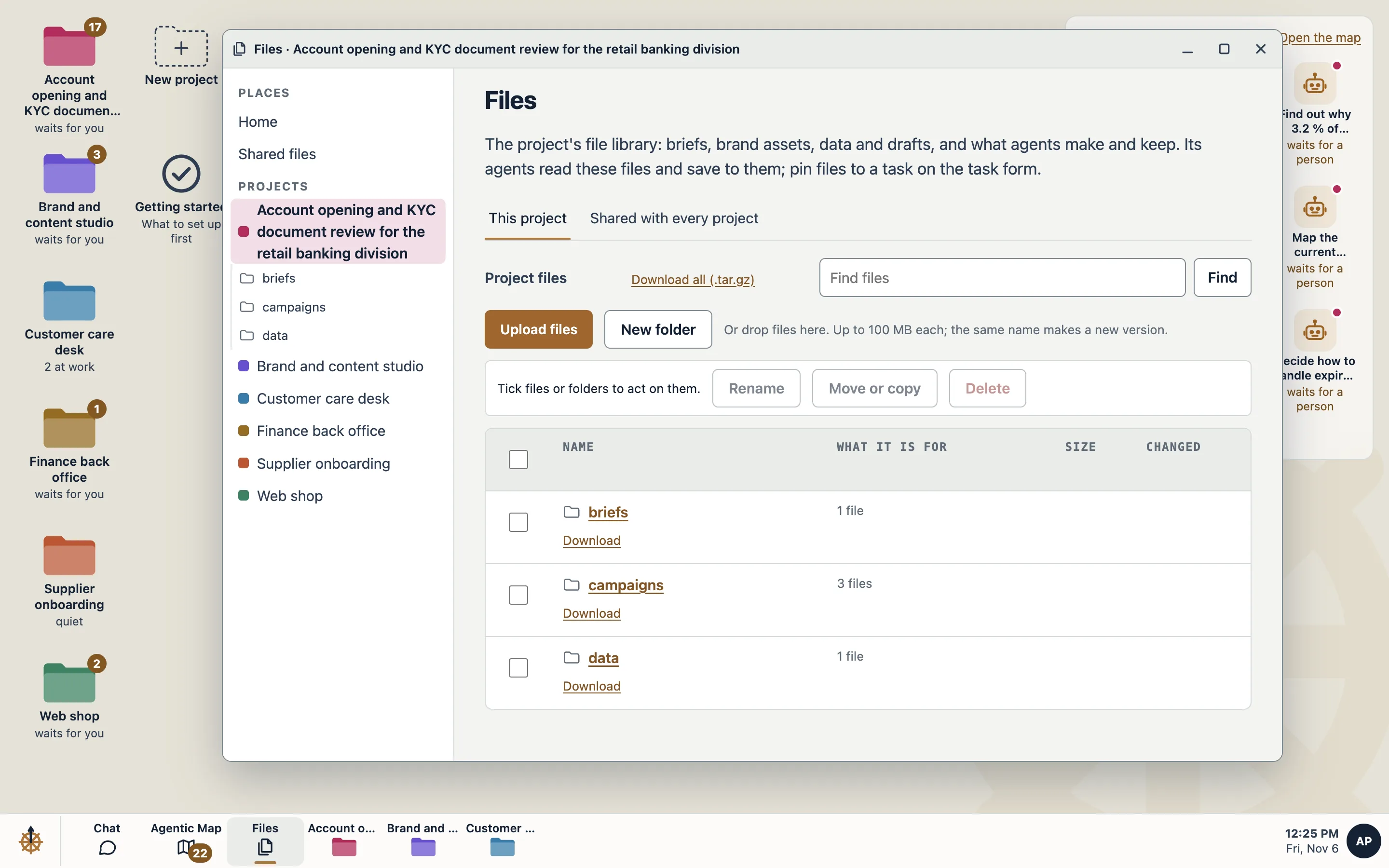
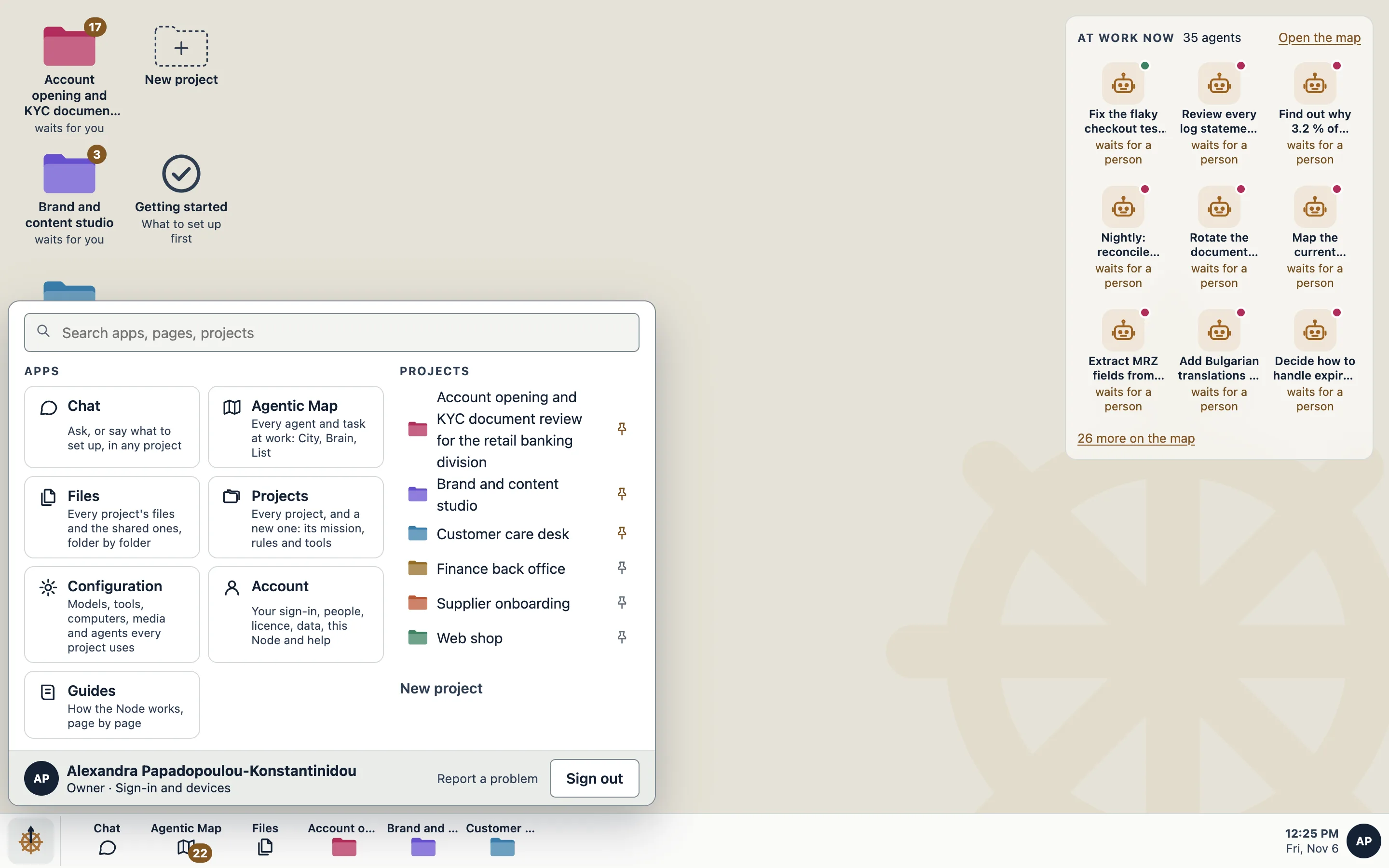
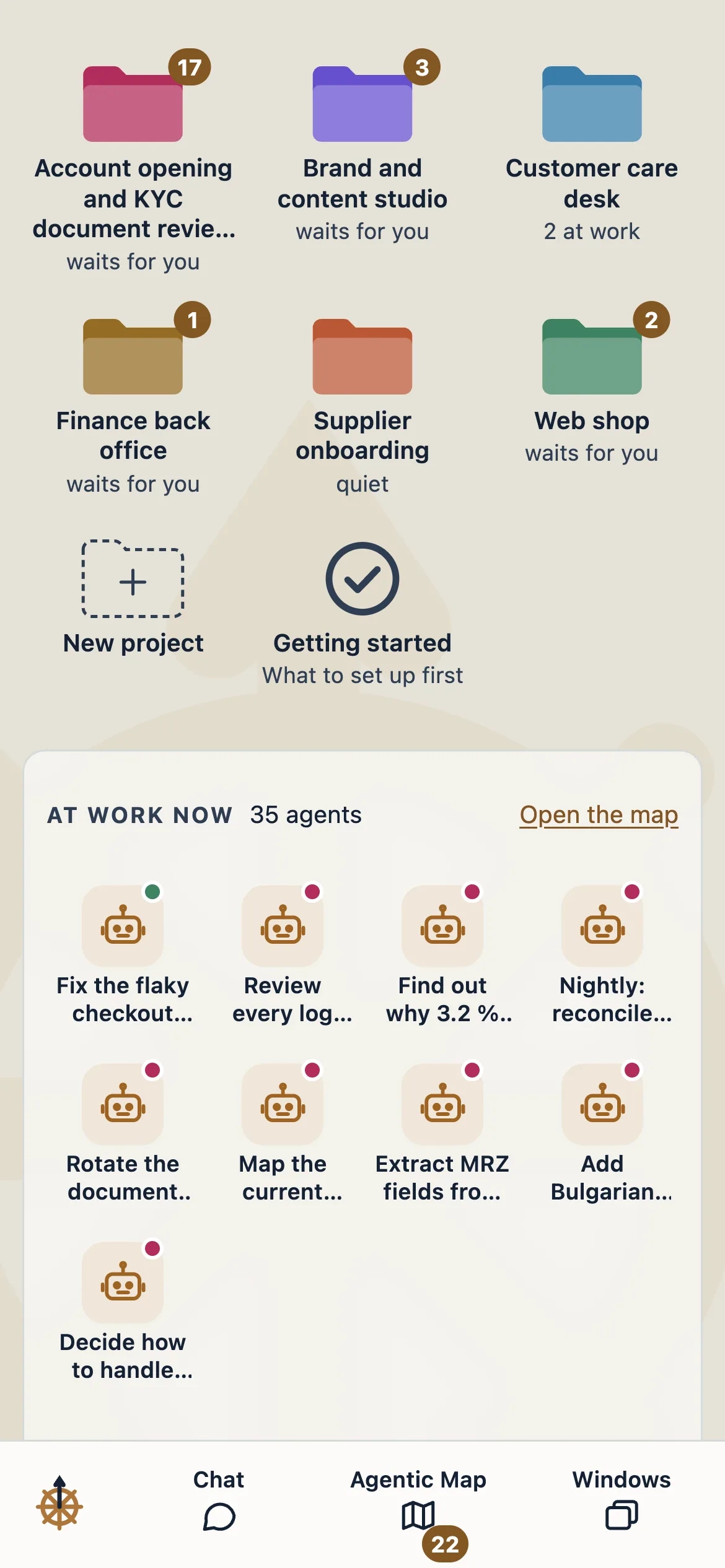
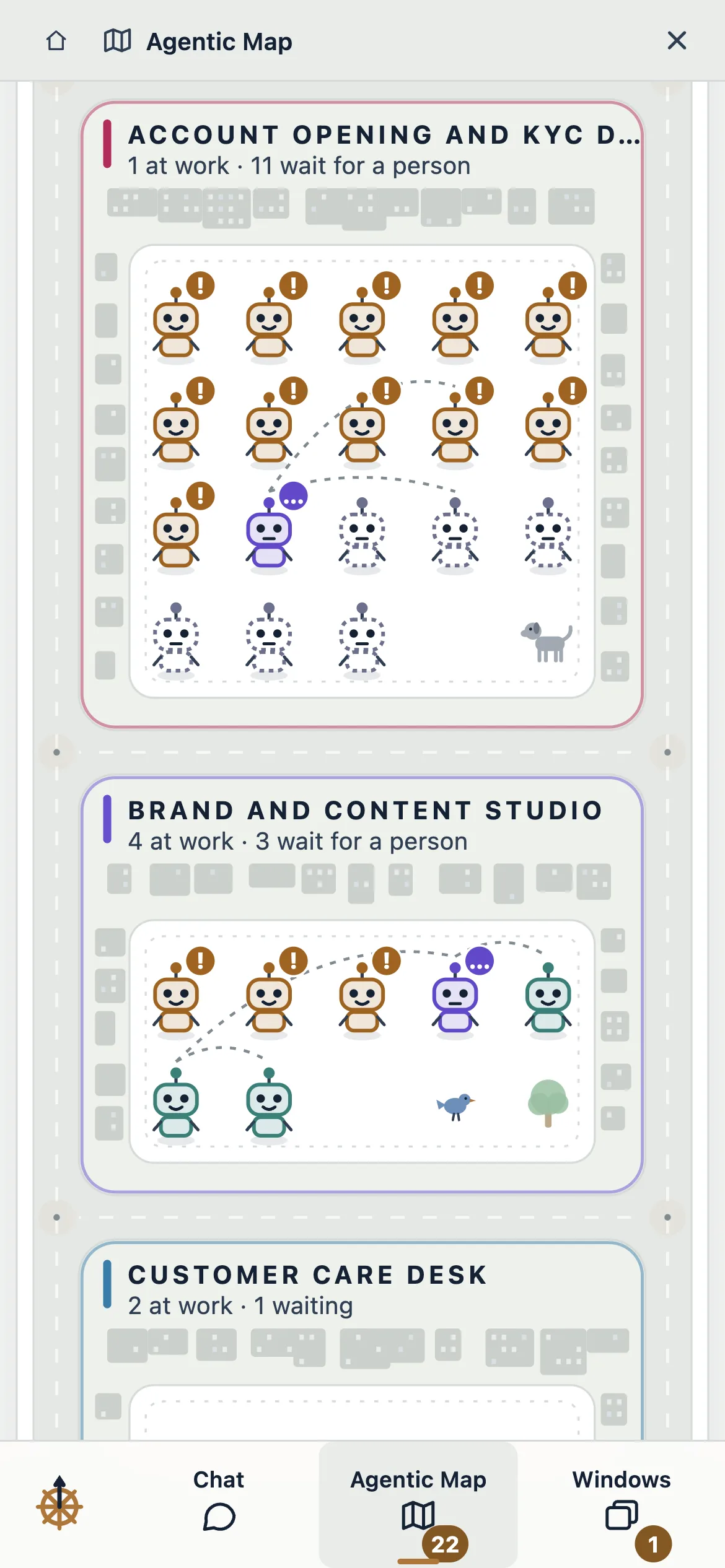
Each team's work is a folder in its own colour. Pin the ones you use to the bar; open one and its board is there.
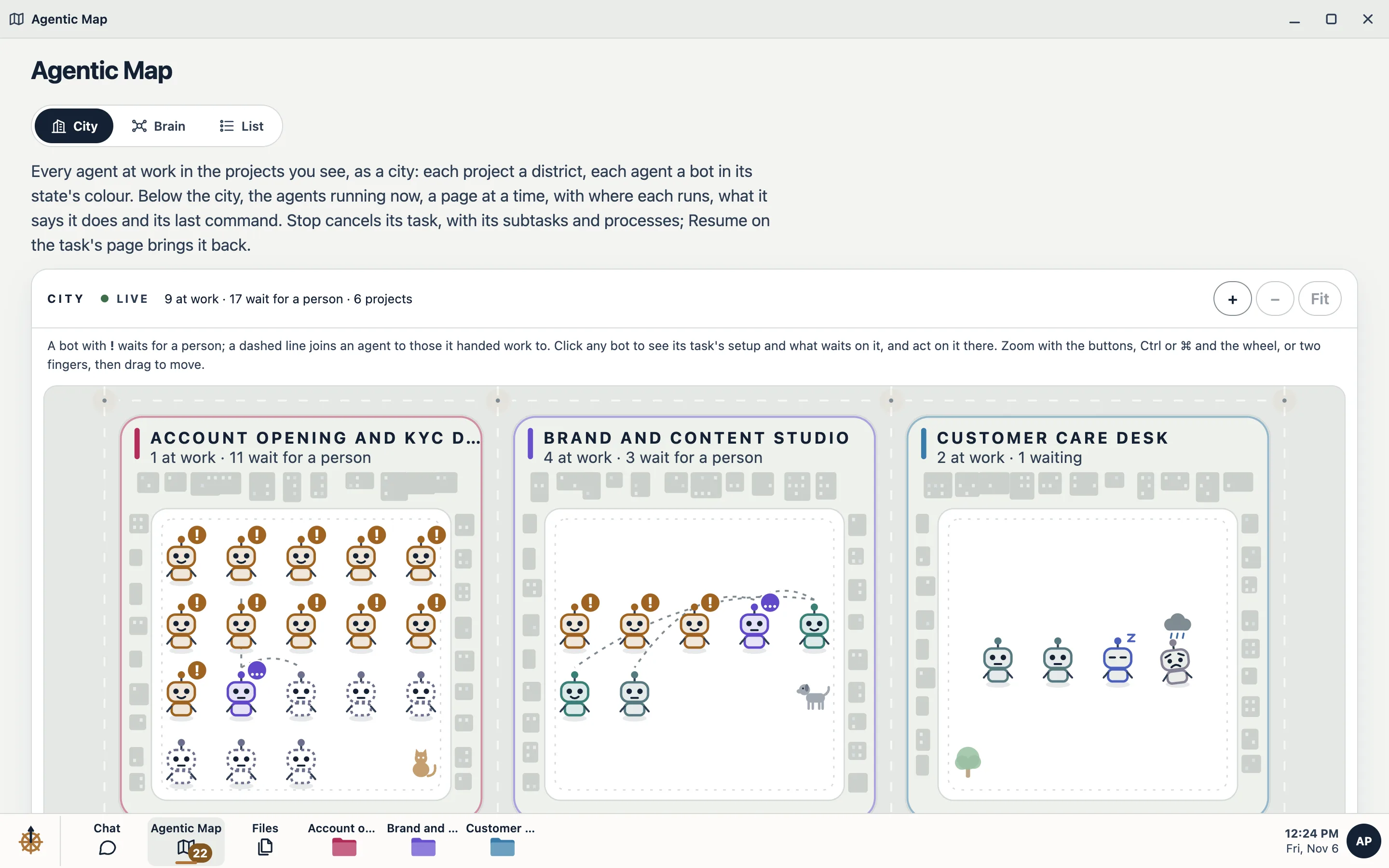
The desktop shows who is working and who waits for a person. The Agentic Map shows every agent at once, as a city, a brain or a list.
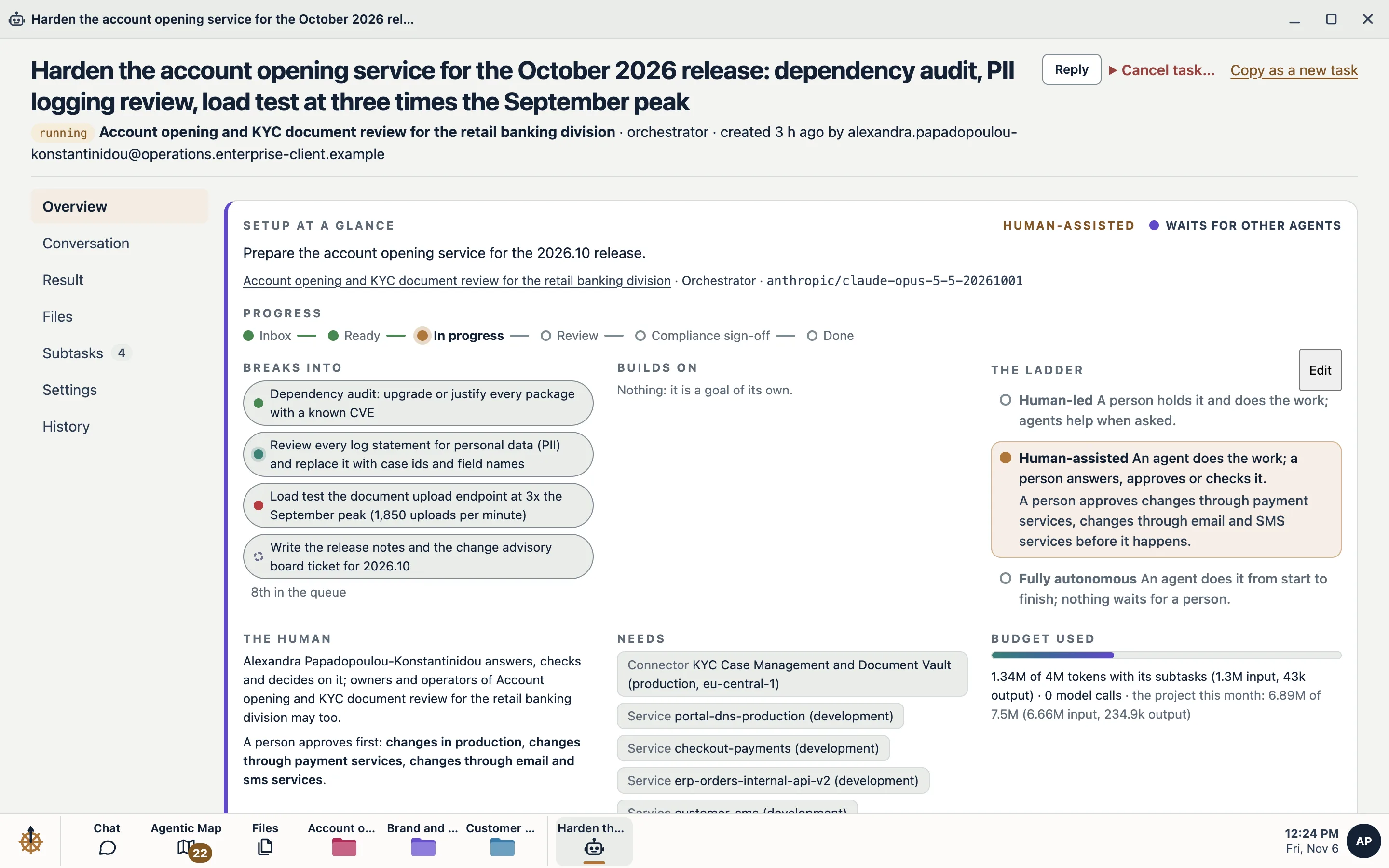
Goal, conversation, result, evidence, files and settings in one place. Keep several open side by side and move between them.
Describe what you need. The Chat builds the projects, roles and routines from what your Node offers, and never widens what your rules allow.
Shared files and every project's library, with folders, versions and previews, kept on your own infrastructure.
Windows move and snap on a desk, two share a tablet, and a phone gets one at a time. Light and dark, by your device's setting.
The problem
Client files, source code and contracts go into tools your company never approved, on servers it doesn't control, under terms nobody reviewed.
Why now
Mid-size companies sit in the gap. They carry the same confidentiality duties as large enterprises, without the budget for a private AI build. So AI gets used anyway, on personal accounts, with client material, and nobody can say what left the building.
Most AI assistants send prompts, files and code to the vendor's cloud. Client contracts, privilege and confidentiality duties often forbid exactly that.
A per-seat fee plus credits, tokens or agent-hours makes AI spend hard to predict. Teams end up rationing the tool the company is paying for.
An agent that acts with nobody approving, and leaves no record of what it did, will not pass your risk team, your clients' questionnaires or your auditors.
In June 2026 a US order cut foreign nationals off a leading lab's newest models with about 90 minutes' notice. The freeze lasted 18 days. Work built on one vendor's model stops with it.
Gartner First Take, June 2026
of IT decision-makers say data-residency concerns have delayed or scaled back their AI initiatives.
Cloudian survey, Feb 2026would choose on-premises, private cloud or hybrid for AI that involves sensitive data.
Cloudian survey, Feb 2026of large US companies have defined cases where autonomous AI decisions are prohibited; 74% review costs before approving AI.
KPMG AI Pulse, Q3 2026of agentic AI projects will be cancelled by the end of 2027, over costs, unclear value or inadequate risk controls.
Gartner, June 2025The product
Your Kybernetes Node is the whole platform, running on infrastructure you control. We install it, keep it updated and support it. Our hub never sees your work.
What a Node holds
People, agents, keys, models and records meet in one place you own. What reaches the outside is short, listed and visible to your owners.
Passkeys, or your identity provider over OpenID Connect or SAML, with SCIM provisioning.
70 apps: business tools, Git hosts, clouds, payments and servers over SSH, each attached to the projects you choose.
Open models on GPU lanes in your own account at RunPod, Vast.ai, Verda or Phala Cloud, confidential GPUs included, or on hardware you own.
Anthropic, OpenAI and Google, called directly with your keys, and Claude Code on your people's own Claude subscriptions. Never through a reseller.
How it works
An orchestrator plans each goal and hands the steps to specialist agents. Each works in a sandbox of its own, proves what it did and stops for a person where your rules say so.
From a sentence to a result
Work is a project with a mission and rules, not a chat window. Every agent reads the mission and rules first and follows them over anything it finds in files, tickets or web pages.
Describe the goal in plain language on the board, the task form or the Chat. Make checkout load in under two seconds on phones; done when Lighthouse scores above 90.
An orchestrator sizes the goal, does small work itself and gives larger steps to specialists, choosing a role and the best-fitting model for each.
Agents use real tools in their sandboxes. When one lacks something (a site, a key, a file, a decision) it asks, and resumes when a person grants it.
Tests, coverage and Lighthouse reports are read and checked. Failures go back to the agent to fix the cause, never to weaken the check. Screenshots, videos and traces are kept.
Out of the box, payments, messages, changes to staging or production and merges into your main branch wait in Needs you; you choose what waits for each tool. Approving runs exactly what was shown, once.
Results land where the goal said: a pull request, the project's files, a server, a connected system. Each is marked delivered with evidence, or failed with the reason.
From our reference Node
An agent took a coding task, wrote the functions and their tests, fixed its own failing test and opened a draft pull request. When someone replies to a finished task, the next turn continues on the same branch and the same pull request.
Use cases
Each team works in its own projects, with its own rules, budgets and people. Items marked in final testing are built and complete their live trials before they are offered in production.
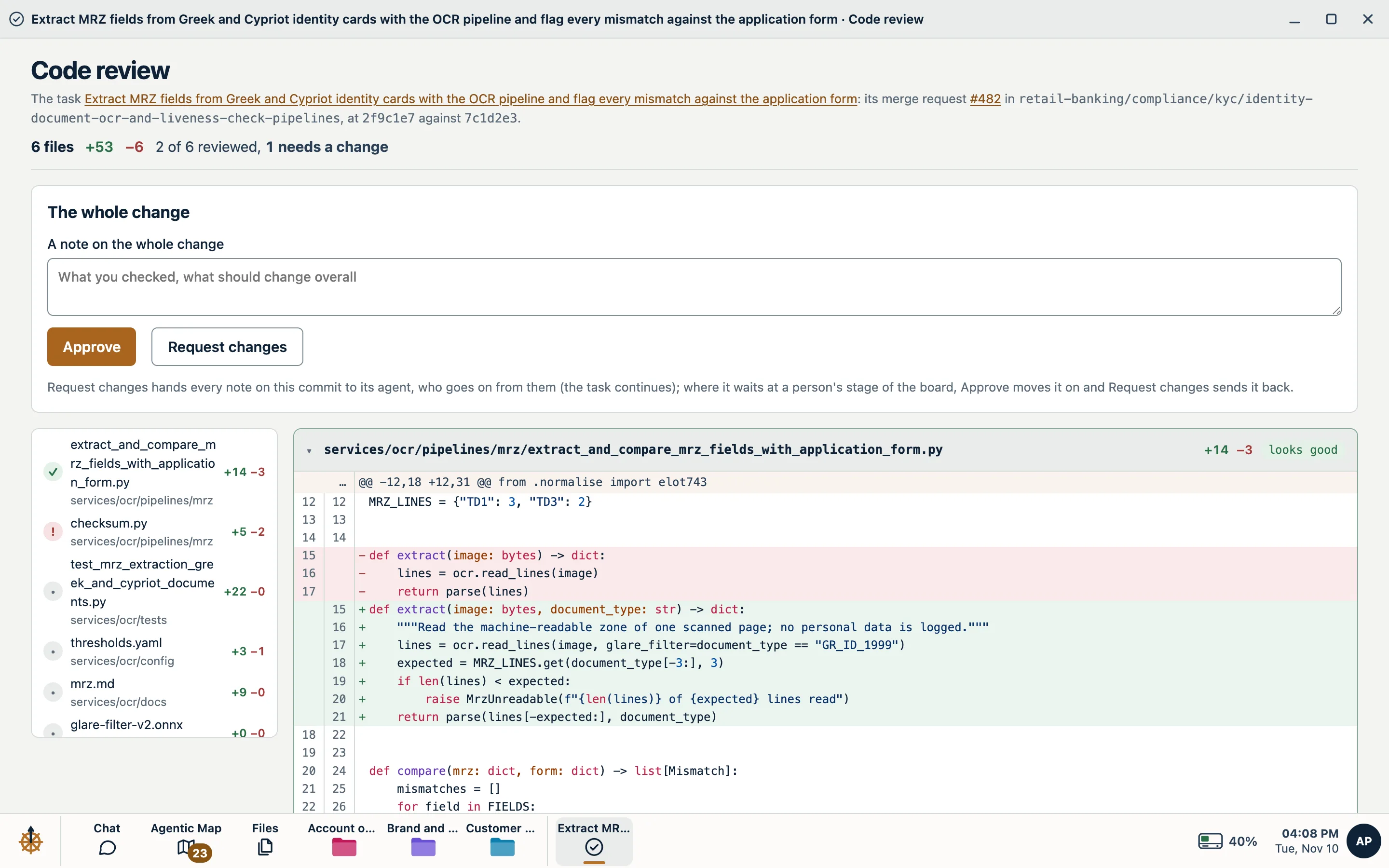
Tickets taken from the board and returned as pull requests with test results, coverage, Lighthouse scores, screenshots and Playwright traces. Review each change file by file in the console and approve it there, or send notes the agent works from. A live preview of the running app for sign-off, and your CI on GitHub, GitLab or Forgejo read before review.
Go, Rust, Java, .NET, Ruby, PHP, C/C++, Node.js and Python · Chromium, Firefox and WebKit · PostgreSQL, MariaDB and Valkey beside the agent
Infrastructure changes planned with OpenTofu, Helm, kubectl and Ansible, then applied through your Cloudflare, Hetzner, DigitalOcean or other API keys, per environment. Servers reached over SSH with pinned host keys. Whole tasks can run on your own Linux machines.
Production commands wait for a person by default
Recurring work on a schedule: a weekday 09:00 report, budget variance analysis, invoice reconciliation, board updates, OKR tracking and RAID logs. Each run keeps its state and takes your corrections forward.
150 starter skills and over 100 ready-made roles, from chief of staff to finance and risk analyst
Web research through Brave, Tavily, Exa or your own SearXNG, with every search on the record. Reports, briefs, requirements documents and runbooks saved to the project's file library, with versions.
Project memory keeps decisions and preferences, each with where it came from, confirmed only when a person or a tool's result showed it
Compliance evidence collected, security findings written up from notes and tool output, and lab servers checked over SSH with the engagement's credentials, given to that task and its steps and deleted when it ends.
Credentials are used through the Node and cleaned from every reply
Official MCP servers of over 40 vendors as apps, among them Atlassian (Jira and Confluence), Notion, Linear, Asana, GitHub, Stripe, Sentry, Intercom and Pipedrive, plus any MCP server you add. Each tool is off, approved or automatic, and new tools start off.
Changes made through apps are journaled, with an agent ready to put them back
Scanned PDFs and images read into structured text with tables, and translation across about 70 languages, on open models that run on your own GPU lanes. Word documents and text PDFs are already searched and previewed without any GPU.
Pages read and characters translated stay within monthly budgets you set
Campaign images and edits, short video, narration, music and transcription on open models. Every request passes a safety layer that refuses when in doubt, every file carries signed provenance, and a voice is cloned only with the speaker's recorded consent.
Withdrawing consent stops the voice at once and deletes its samples
Apps
Everything agents reach outside the Node is an app. Install it, set it up once and choose which projects may use it. Agents never see a key: they name the app and say what to do, and the Node makes the call within the app's rules. 70 apps are ready on day one.
Official MCP servers: Atlassian (Jira and Confluence), Notion, Linear, Asana, ClickUp, Trello, Intercom, Help Scout, Pipedrive, Attio, Calendly and more, plus any MCP server you add.
GitHub, GitLab, Forgejo, Gitea or any Git over HTTPS. Each account is an app, with its repositories, its sign-in and rules for each branch.
Cloudflare, Hetzner Cloud, DigitalOcean, Vercel, Netlify, Render, Supabase and Neon, and your own servers over SSH, set up per environment.
Stripe, PayPal, Paddle, Mercury and Brex; Twilio, Postmark, Resend and Fastmail. Out of the box, a payment or a message waits for a person.
RunPod, Vast.ai, Verda and Phala Cloud, your own GPU servers, cluster or inference servers, and Anthropic, OpenAI and Google with your keys. Each GPU app runs its own lanes.
Brave, Tavily, Exa or your own SearXNG, Perplexity, Firecrawl and Jina AI; Sentry, PostHog, Mixpanel, Amplitude and Grafana Cloud.
Control and governance
The limits are enforced by the platform, not written into a prompt. A sandbox, a closed network, a vault and approval gates stand between every agent and anything it could break.
What your risk team gets
Out of the box, payments, messages, deployments and merges into your main branch wait for a person. You decide what waits on each app, server and repository.
Each app tool is off, approved or automatic, per environment; servers wait by environment and kind; Git by repository and branch. The approver sees the exact request and approves it once; a denial reaches the agent with its reason.
Each project's Needs you lists its questions, approvals, requests and tasks waiting for a person, and the Agentic Map counts every wait across projects. A daily email and browser notifications are optional.
Work an agent creates (subtasks, new tasks, schedules) inherits its creator's limits and never exceeds them. Agents ask for capabilities; people grant them.
App, Git and server credentials are sealed in the Node's vault (AES-256-GCM, with a key made on your Node). The Node makes each call for the agent and cleans secrets from what comes back; a private value reaches an agent's commands only if you tick it.
Sandboxes reach only the hosts a project allows, starting with trusted package registries and code hosts. Cloud metadata and private networks stay closed unless your installation opens them, and every refusal is recorded with a one-click allow.
Token budgets per project and per task; for every GPU lane, a price cap per hour and a monthly budget that stops it or alerts you; and daily caps on work agents create.
Every change made through an app is kept with what was read before it. Ask an agent to put it back, and the request opens as a task.
Every row chained by SHA-256, a signed checkpoint every 15 minutes, verified daily, and streamed to your SIEM over syslog with TLS, Splunk HEC or HTTPS.
Passkeys, or single sign-on from Entra ID, Okta, Google Workspace, Keycloak or Ping, with SCIM. Roles for Owner, Operator, Support, Finance and Viewer; Operator, Support and Viewer can be kept to chosen projects.
Models and compute
Open models run on GPU lanes in your own account or on your own hardware. Frontier labs join with your own keys. Each project decides which of them may see its data.
Your choice, enforced
Every project names the places its data may be processed. The gateway checks each call against that policy and refuses anything outside it.
| Where inference runs | What it covers | Who could see prompts |
|---|---|---|
| C0Your hardware | An inference server you already run (vLLM, SGLang, TGI, NVIDIA NIM, Ollama), Available GPU servers you join to the Node, or your own GPU cluster through its API, In final testing | Only your organisation |
| C1GPUs rented in your account | Open models on GPU lanes in your own account at RunPod (Secure Cloud), Vast.ai (verified hosts), Verda or Phala Cloud, only in the countries you allow, encrypted end to end with TLS ending inside the machine. A project can require confidential GPUs, whose hardware your Node verifies before use | The GPU host's machines; its proxy and network carry only encrypted traffic. On confidential GPUs the hardware also encrypts memory |
| C3Frontier labs, your keys | Anthropic, OpenAI and Google, called directly with your own keys, and Claude Code on your people's own Claude subscriptions; off until you enable them | That lab, under your own agreement with it |
Fully permissive licences only (MIT, Apache 2.0, OpenMDW), with no use policies or thresholds. The catalog is signed and every model file is checked against its hash before it loads. Lanes never fetch from public model hubs.
Installation and operations
We install, update and support the Node. When the installation is done you can remove our access, and from then on we can't act on your server until you grant access again.
Running it
A Node is single-tenant: one company, one installation. It needs an x86-64 server with Ubuntu Server 24.04 or 26.04 LTS (from 2 vCPU, 4 GB of memory and 40 GB of disk; 8 vCPU and 32 GB to run several agents at once), on your premises or in your cloud account, and a domain. Sandbox servers and GPUs join as you grow.
Plans and pricing
Your Node enforces the allowance itself and reports nothing about your use to us. GPU time is never counted; the GPU allowance is how much GPU memory your lanes may hold at once. There is no meter, no overage bill and no usage report to dispute. The larger the plan, the less each seat and project costs. You pay your GPU provider and any lab you connect directly; we never resell compute.
| Plan | Seats | Projects | GPU memory at once | Monthly, billed annually | Support, included |
|---|---|---|---|---|---|
| Baby | 5 | 5 | 300 GB1 GPU | $150early bird $99 · founders and startups | Email, best effort |
| Studio | 15 | 10 | 600 GB2 GPUs | $616early bird $399 | Email, best effort |
| Team | 30 | 15 | 1.2 TB4 GPUs | $1,290onboarding $1,500, optional | Email, within 72 hours |
| Business | 60 | 20 | 2.4 TB8 GPUs | $2,532onboarding $3,500, optional | Email, within 72 hours, with a named contact |
| Enterprise | 100 | 25 | 3.6 TB12 GPUs | $3,999onboarding $7,500, optional | Email, next working day |
| Custom | Racks of GPUs, from 72 B300-class, or more seats and projects than extras suit | Priced per case | A tailor-made agreement | ||
Keep your plan and add only what you need. A GPU here is 300 GB of GPU memory held at once, about one B300-class GPU or two H200s; what your lanes hold is rounded up to the next 300 GB.
The plan that costs least for what you need, with the extras it takes.
Early bird. Our first clients pay $99 a month for Baby and $399 for Studio, and keep that price for as long as they stay with us, adjusted only for inflation once a year.
Baby is for founders and startups: the whole operating system, workspace and toolset for a team of five, with 300 GB of GPU memory for open models. It needs no GPU to start. Each founder can connect their own Claude Pro or Max subscription, and the agents work on it in Claude Code, with the board, sandboxes, checks, live previews, schedules and approvals around them that Claude alone, in an editor or the Claude app, does not give you.
The allowance counts GPU memory held at the same moment, on rented GPUs or your own. Hours are never counted, and work through your own frontier-lab keys or your people's Claude subscriptions counts against no GPU allowance.
Studio and Team may also pay monthly, at 20% more. Two-year terms take 5% off and three-year terms 10%, with the price held for the term. Non-profits and education: 30% off. At a limit the Node holds back new use and says why; it never deletes anything.
Compared
Published list prices. Most AI suites charge per user and add usage on top, and all of them run your work in the vendor's cloud.
| Product | List price | Where your work runs | Pricing model |
|---|---|---|---|
| Microsoft 365 Copilot | $30 a user a month, plus Copilot Studio credits | Microsoft's cloud | Per seat plus usage |
| Gemini Enterprise | $21 to $60 a user a month | Google's cloud | Per seat |
| Amazon Quick | $20 to $40 a user a month, plus $250 an account and $3 an extra agent-hour | AWS | Per seat plus usage |
| NVIDIA AI Enterprise | $4,500 a year for each GPU you run it on, for NVIDIA's AI software and support. The GPU itself is bought or rented separately. | GPUs you own or rent; a software stack with no agent workspace, approvals or managed service | Per GPU, software only |
| Kybernetes OS | $150 to $3,999 a month for the whole plan: agents, apps, approvals, audit, GPU control and our managed service. GPUs are paid to your provider, or are your own. | Your server or cloud account | Flat allowance, no usage charge |
The result
Your people spend their time deciding and reviewing. The agents do the rest, inside your walls, on the record.
Get started
Every demo runs on our reference Node, with a project built around the work your company does.
A goal turned into a delivered result on the board: a pull request with its checks and a live preview, an infrastructure change waiting for approval, or a report from your kind of research.
FreeYour own Node on the Team allowance, onboarding included, working on your projects with your people. Credited in full to your first year when you sign within 30 days of the pilot's end.
$3,000The plan that fits, billed annually. Move up as you add people, projects and GPUs, with add-ons for the months in between.
From $150 / moWrite to us and we'll set up a 30-minute demo around the work your company does.
Questions risk teams ask
A licence check-in over HTTPS that carries the installation's identity and the licence it holds. By default also health heartbeats (numbers and states only, which your owners can preview), reports of the Node's own errors, and a daily count of the errors agents met; each can be turned off. Problem reports leave only when a person writes one. Prompts, answers, files, code and usage figures never reach us.
During installation, yes, through an account you create for us. At the end you can remove it, and from then on we cannot act on the server until you grant access again. Updates arrive as signed releases that your owner approves, or that install automatically if you choose.
That depends on what each project allows. On your own hardware, only your organisation. On GPU lanes in your own provider account, traffic is encrypted end to end and only the provider's machines are trusted; on confidential GPUs the hardware encrypts memory too. A frontier lab sees only the projects you enable it for, under your own agreement with that lab.
The platform, not the prompt. Agents work in throwaway gVisor sandboxes on a closed network, never hold your service keys, and cannot exceed the permissions of whoever started them. Payments, messages, production changes and merges into your main branch wait for a person by default, and everything is in the audit log.
No. An app's tools are calls your Node makes for the agent, within the app's rules, and its keys stay in the vault. An app's own code, when it has any, runs in a WebAssembly sandbox with no network and no files. An update that asks for anything new (a host, a tool, a looser default or a secret) waits for your owner, and Roll back returns the app to its version before.
Move the affected projects to another model: an open model on your own GPU lane, your own hardware or another lab you have connected. Agents, skills, memory, files and history stay on your Node.
The Node holds back new use (an invitation, a new project, a lane start) and says why. It never deletes anything, and a lower limit never stops a running lane. GPU time is never counted, so a lane is never stopped for running too long.
Businesses only, never consumers. Each client runs its own Node and answers for its own use of it, its customers' data and the providers it connects; we provide the software and the managed service, and we hold none of your data. The Terms of Service and How we handle data say so in full.
The settings laws ask for are built in and off until you choose them: retention periods, legal holds, requests about a person, a record of where data went and of every agent action. The Compliance page lists them by country, and your owners decide what to turn on.
The Node turns read-only. Nothing changes, your data stays intact and readable, and you can still delete it. A Node that cannot reach our hub for longer than its offline allowance (7, 14 or 30 days) locks until it reconnects.